Calculate Geofactors
The flow estimation model uses a machine-learning (ML) approach to predict water flow in each subcatchment. At the core of this method is a regionalization process that builds a predictive relationship between model parameters and the physical and hydrological characteristics -referred as geofactors- of the subcatchments. These geofactors include properties such as area, slope, land use and other attributes known to influence hydrological behavior.
Once this relationship is established, it can be applied to ungauged subcatchments, allowing the model to estimate their parameters and simulate water flow even in the absence of direct measurements. The tool automatically derives the necessary geofactors from the provided input datasets, guaranteeing consistent and data-driven parameter prediction across all subcatchments.
Input data
gauged_subcatchments.shp (from Contributing Area of Gauging Station)
ungauged_subcatchments.shp (from Fix River Network)
fixed_river_network.shp (from Fix River Network)
DEM.tif
water_area.shp
forest_area.shp
settlement_area.shp
precipitation data
The first three input data were already discussed previously. DEM.tif, is a digital elevation model raster file. water_area.shp, forest_area.shp and settlement_area.shp are polygon shapefile representing respectively water bodies, forest and settlement area. Last is precipitation data that can be stored as several .nc files in a folder or as a unique raster file. The precipitation data should cover a time series equal to the time series selected for the flow at the gauging stations. An example representing these input data related to the Warnow catchment (Germany) can be found in Fig. 9.
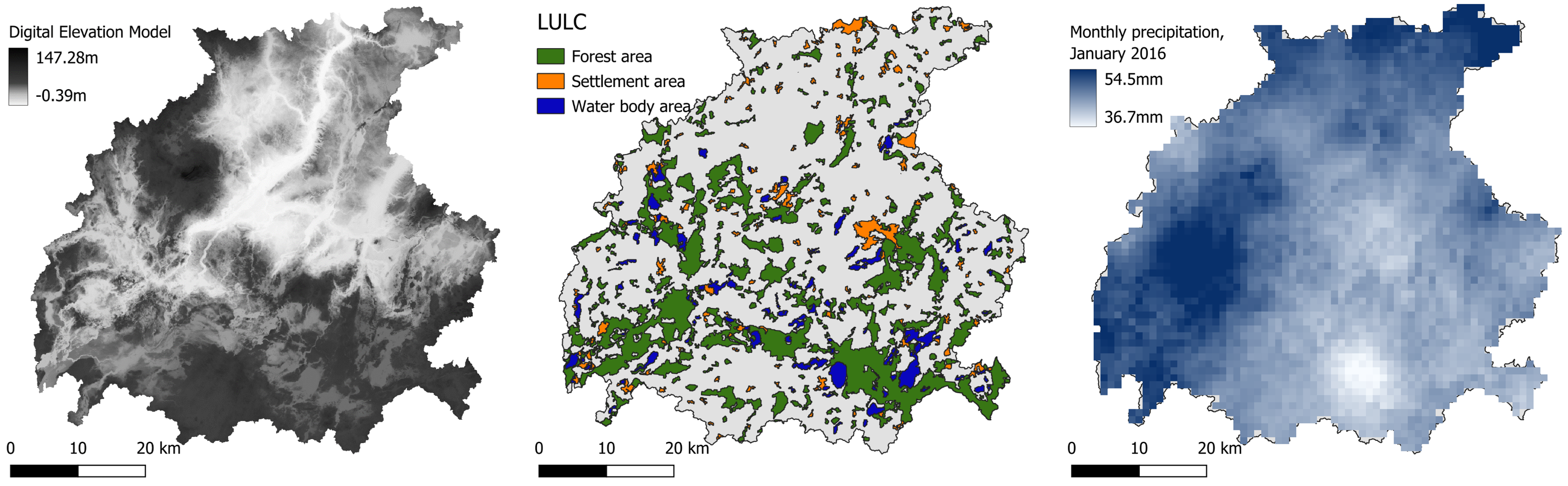
Fig. 9 From left to right: DEM, LULC and precipitation data for the Warnow catchment (Germany).
In Table 2 it is shown an example of possible sources where the necessary data can be found. For the ERA5 precipitation dataset, “Monthly averaged reanalysis” should be selected as Product type, “Total precipitation” as Variable and “NetCDF4” as Data format.
Input data |
Format |
Source |
|---|---|---|
DEM |
Raster (.tif) |
|
Water area |
Shapefile (.shp) |
|
Forest area |
Shapefile (.shp) |
|
Settlement area |
Shapefile (.shp) |
|
Precipitation data |
NetCDF (.nc) |
Workflow
Add all the input data to the project by clicking on “Layer –> Add Layer –> Add Vector Layer”
Go in the Processing Toolbox and look for the APRIORA plugin. Click on Hydro-Module and open 3 - Calculate Geofactors
Choose ungauged_subcatchments.shp as input for Ungauged subcatchments
Choose gauged_subcatchments.shp as input for Gauged subcatchments
Choose DEM.tif as input for Digital surface model
Choose fixed_river_network.shp as input for River network
Choose water_area.shp as input for Water area
Choose forest_area.shp as input for Forest area
Choose settlement_area.shp as input for Settlement area
Select the precipitation data folder containing your NetCDF (.nc) data. The tool accepts multiple files (one .nc file per year) or single file (one aggregated .nc file containing the full time series). Then tick the box accordingly (e.g., if the precipitation file has been downloaded from ERA5, tick this box)
Select which is the driest month in the catchment (default value: August)
Click on Run
Important
Video tutorial will follow soon.
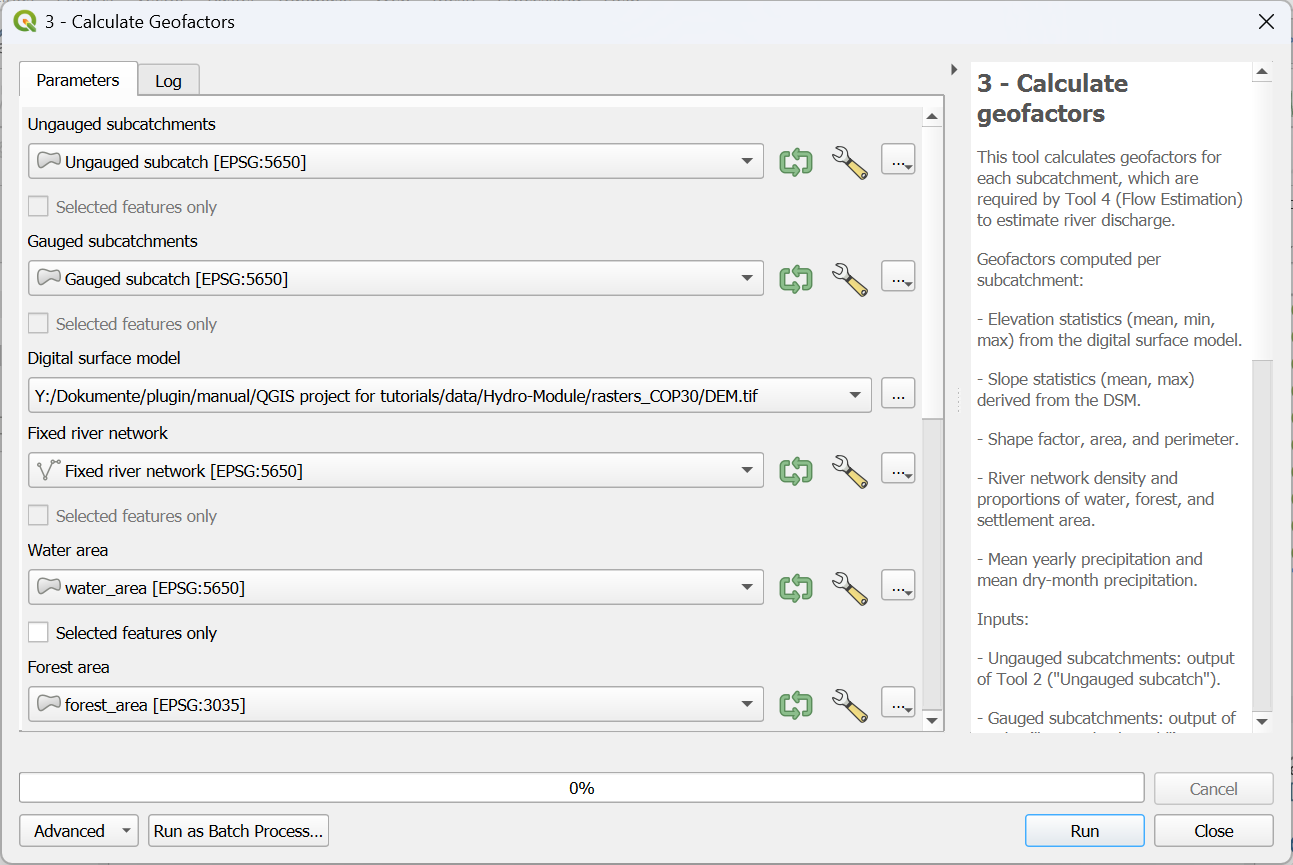
Fig. 10 Interface of the “Calculate Geofactors” window (pt.1).
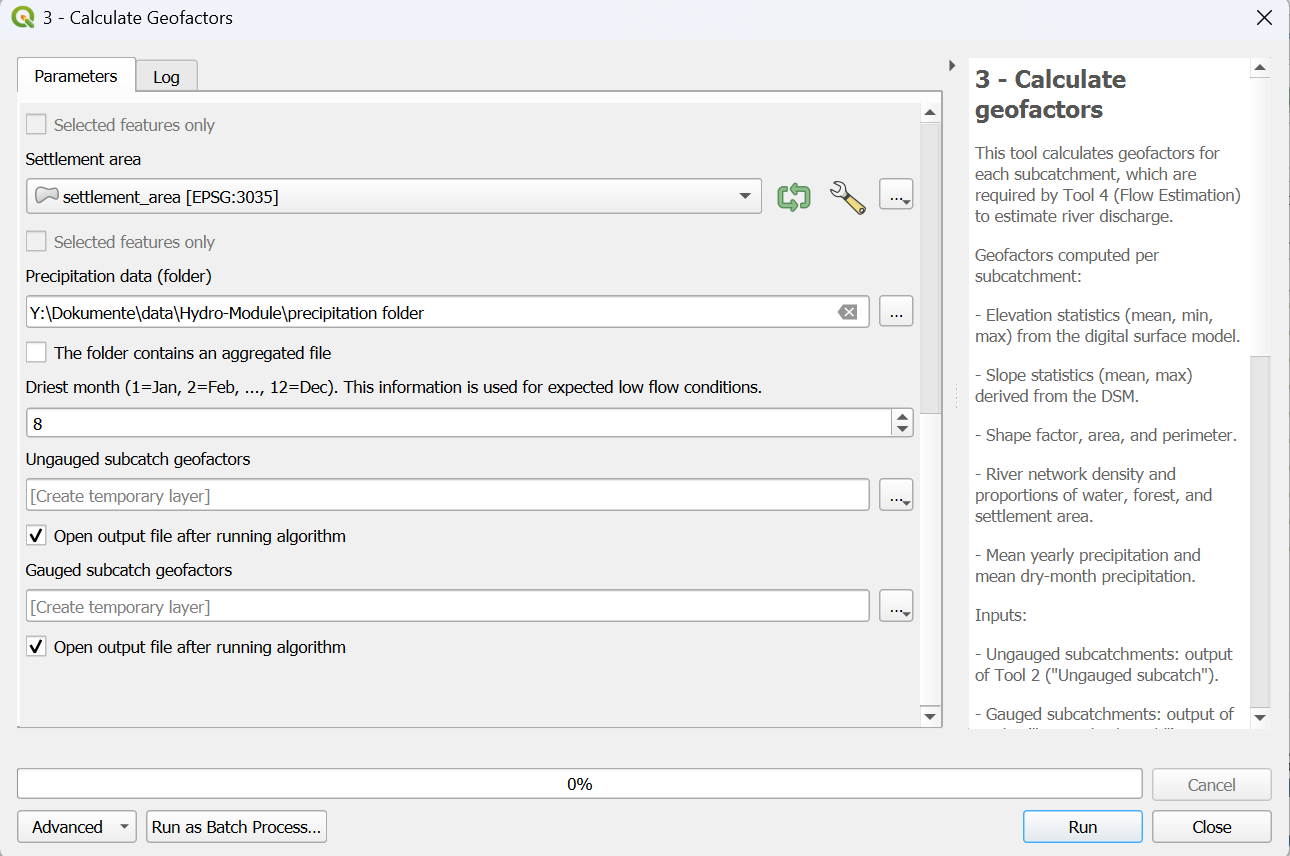
Fig. 11 Interface of the “Calculate Geofactors” window (pt.2).
Output data:
gauged_subcatch_geofactors.shp
ungauged_subcatch_geofactors.shp
Now let’s explore the attribute table of the two outputs. You will notice that several new fields have been added. Table 3 explains what each field represents.
Column ID |
Full name |
Description |
Unit |
|---|---|---|---|
Mean_Flow [1] |
Mean flow |
Average standard flow calculated for a certain time series at the gauging station |
m³/s |
M_Low_Flow [1] |
Mean Low Flow |
Average low flow calculated for a certain time series at the gauging station |
m³/s |
H_mean |
Average height |
Average height within the subcatchment |
m |
H_stdev |
Minimum height |
Minimum height within the subcatchment |
m |
H_min |
Standard deviation of the height |
Standard deviation of the height within the subcatchment |
m |
AREA_SC |
Area of the subcatchment |
Area of the subcatchment |
km² |
PERIM_SC |
Perimeter of the subcatchment |
Perimeter of the subcatchment |
km |
SHAPE_SC |
Shape of the subcatchment |
Add formula somewhere |
[-] |
Slp_mean |
Average slope |
Average slope within the subcatchment |
% |
Slp_stdev |
Standard deviation of the slope |
Standard deviation of the slope within the subcatchment |
% |
RivNetDens |
River network density |
sum of the river network’s lenght within the subcatchment divided by the area of the subcatchment |
km/km² |
PropWatAr |
Proportion of water area |
(Area of water bodies divided by the area of the subcatchment)*100 |
% |
Forest % |
Forest share |
(Area of forest divided by the area of the subcatchment)*100 |
% |
Settl % |
Settlement share |
(Area of settlement divided by the area of the subcatchment)*100 |
% |
PrecYearly |
Yearly precipitation |
Average yearly precipitation |
mm |
PrecDry |
Dry month precipitation |
Average precipitation during the dry month |
mm |